NoScript add-on for Firefox

If you’re like me, you frequently get called on to help others out when they experience “issues” on their computers. Let’s face it, we’re front-line tech support for many of our family and friends. One tweak that I like to do on family computers is #1 to switch them over to using Firefox as their default browser and #2 installing the NoScript add-on to Firefox. CNet has a quick video explaining NoScript (see below) but I end up having to take a more pragmatic approach by selecting “Scripts Globally Allowed”. Let’s face it, the first time a site doesn’t work because scripting was blocked, they’re going to make you set it anyways.

Even with scripts allowed globally, NoScript still protects you from other issues including Cross-Site Scripting (XSS), Click Jacking and other nastiness that they’ll run across while browsing. It even has a setting to help encourage SSL connections to various sites to help prevent cookie hijacking while you’re on the road. While not a complete secure browsing solution, it’s another layer of security that MAY result in a couple less support calls.

Don’t just take my word for it, Steve Gibson has mentioned NoScript many times in his Security Now podcast. For more info on NoScript and what it offers, scope out the features of NoScript.

Disclaimer: Your mileage may vary. Don’t blindly follow my lead…do your own research and configure the sphincter pressure of your NoScript settings at whatever comfort level you have based on your research.

Posted in Computers and Internet | Tagged , , | Leave a comment

Texas Puke

We’re heading over to a community-wide Chili cook-off in a few minutes. Rather than trying to compete with the “most authentic” or “hotter than blazes” categories of chili, we decided to make a concoction that I can only categorize as “most addictive”.

The reason our entry is called “Texas Puke” is not actually known. Some surmise that it is because it “looks like puke” as it has a wide assortment of beans, salsa, cheeses (does Velveeta actually count as a “cheese”?) and other goodies thrown in. My assertion is that it is called “Texas Puke” because it is so yummy and so entirely addictive that you’ll eat plateful after plateful until you actually puke. This was proven at one gathering wherein my older brother ate so many servings that we lost count and, while driving home, he asked us to pull over so that he could yack alongside the road. Not because the food was bad – quite the opposite, it was so good that he couldn’t stop eating it.

Texas Puke in a crock pot

Texas Puke in a crock pot

The recipe was shared with us by one of my dearest friends – Mr. Ed. Where he got it from is unknown. All I know is that I expect to inflict a consider amount of over-eatage at tonight’s festivities. Here’s the recipe:

Ingredients:

  • Hamburger (2-3 lbs)
  • Pinto Beans (1 can)
  • Salsa – medium/hot chunky (1 jar)
  • Hormel Chili w/beans – (1 can)
  • Chili Beans (2 cans)
  • Heavy Whipping Cream (1 pint)
  • Velveeta Cheese (4 lbs)
  • Mozzarella Cheese – grated
  • Tortilla Chips

Cook hamburger and drain fat. If you want, you can add Italian sausage for more zing. Add Velveeta cheese, beans, whipping cream and salsa in a crock pot and cook for 1-2 hours on slow simmer. Stir often or it will burn.

Once it has cooked, serve over tortilla chips and sprinkle with mozzarella cheese. I usually let the individuals partaking of this delightful goop to season it with whatever chili powders, chipotle seasonings, etc. that they feel their tongues can endure.

Enjoy!

Posted in Uncategorized | Leave a comment

OCEANIC Tech Talk from Two Years Ago

I was doing some housekeeping on one of my web servers this afternoon when I ran across an old Tech Talk video that I recorded two years ago. The OCEANIC Tech Talks were lunchtime presentations that I did every few weeks that basically covered new technologies that had piqued my curiosity. I’d bring a loaf of bread and some peanut butter and jelly for those who didn’t bring their lunch with. I let this particular video run in the background while I worked this afternoon and it dawned on me that not much awesomosity (my made up word) has happened in the last couple of years technology wise. An interesting look back for sure.

Technologies that I discussed were varied and mostly things that I thought could be of use to us either in our personal lives or in our research endeavors.There was one minor disturbance near the beginning when somebody walked in late for the session and they were up on the main campus (~86 miles north of the southern campus) and they were trying to get the two-way video feed to wake up from sleep mode. I was experimenting with Camtasia to do this kind of screencast and never published it because of the little interruption.

Topics for this particular Tech Talk included:

Eclectic and varied technologies for sure. A little bit of something for everybody. Definitely something that I enjoyed doing – researching cool new technologies and presenting the most interesting ones to my colleagues. Now if only I could paid to do this (Note: Donations to the University can indeed be made and earmarked for OCEANIC towards that end ;?)

Posted in Computers and Internet, Science and Technology | Leave a comment

Electric Car Gas Stations

One of the interesting dilemmas that we face as we move forward towards all-electric cars is the issue of “filling up”. Once the charge indicator gets so low, it’s time to top off the charge to make sure you have enough reserve energy to complete your travels. One of the main methods of re-charging the EV’s is the adoption of charging stations like GE’s WattStation, discussed in this video:

The WattStation and other charging station technologies are fine if you have time to stop and charge up, but what about when you’re on a long trip? It’d be nice to have the in-and-out convenience that we have with traditional gas stations. You pull in, fill up and you’re on your way in 5-10 minutes or so.

I ran into another interesting video that discusses a method that allows you to do just that. You pull your car into a Battery Switch Station and a robotic assembly removes the battery pack from underneath your car and replaces it with a fully charged replacement. You’re in, refueled and back on the road in 2 minutes or so. Neat stuff for the road warriors, taxi’s, delivery people, etc. A demo of the concept is here:

Now the trick is to get both of these technologies integrated together. Ensuring that we have the ability to plug-in when we have the time and a charging station is nearby but also designing the vehicles for a quick change of the battery pack for those long hauls.

Posted in Science and Technology | Leave a comment

Shop Vac

Really dug the animated typography on the “Shop Vac” video by Jonathan Coulton and had to share a link – that is all… Enjoy!

And while we’re on the topic of Jonathan Coulton, here’s another of my favorite videos which sport his awesome geeky music. Definitely one that I’ll be sharing with my son later on to help initiate a discussion on the Mandelbrot Set.

Posted in Computers and Internet | Tagged , | Leave a comment

Bermuda DotNet Users Group Firing Up

Who’s up for a road (plus boat) trip? Looks like Bermuda is joining the .NET User Group family soon, with their inaugural meeting on Nov 15, 2010 at the XL Capital building in Hamilton.

Location for the Bermuda .NET User Group Meeting

Bermuda DNUG

Dr. James Martin will be giving the keynote and developer Aaron Erickson will be doing a talk about Dynamic C# as well as touching on what’s new in C# 5. News articles are online with additional details via The Royal Gazette and Bermuda News.

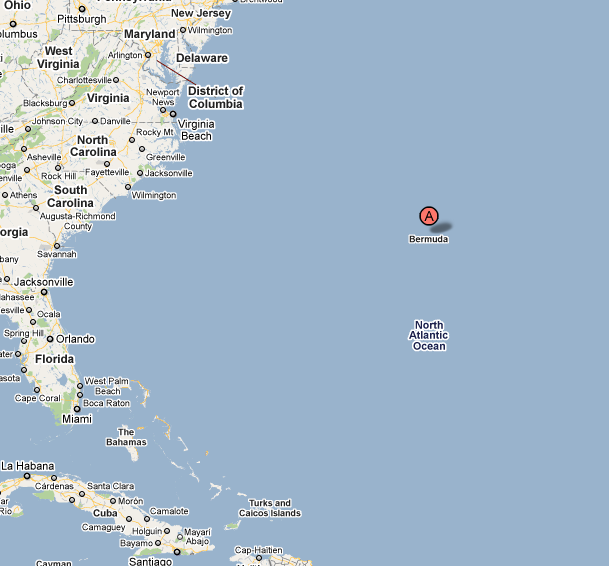
For those unfamiliar with where Bermuda actually is (which I was up until a few years ago) you just head to Charleston, SC then jump on a fishing boat and head east. You’ll be there in no time. (I’d opt for a plane personally though). Another option is the cruise line option, which do lots of round-trip jaunts to/from Bermuda.

Where Is Bermuda?

Where Is Bermuda?

So who’s with me? Who’s willing to take one for the team and head to Bermuda to cheer them on and figure out what’s what with Dynamic C#?

Posted in Computers and Internet | Tagged , | Leave a comment

Disabling Java for Another Layer of Security

“Computers are like onions…” is one of my favorite sayings (stolen from Shrek’s “Ogres are like onions” bit). Why? Because A. they often make you cry and B. they require a layered approach for security. Sure, it’d be awesome to completely lock down a system and make it completely secure, but that involves unplugging it from the network and never powering it up. I tend to make smaller layered approaches with my security settings.

This week a couple of articles came out talking about the upcoming security breaches that are expected due to users having Java installed on their systems. See ‘Unprecedented wave’ of Java exploits hits users, says Microsoft article on Computerworld. Most people will ignore the threat, some may get over-zealous and outright uninstall the Java VM from their boxes, but I chose to just the middle ground. I decided to uncheck the “Enabled” checkbox in the Java settings to temporarily disable Java. This should stop any exploits in their tracks, but still leave Java installed should I need it for any particular purposes.

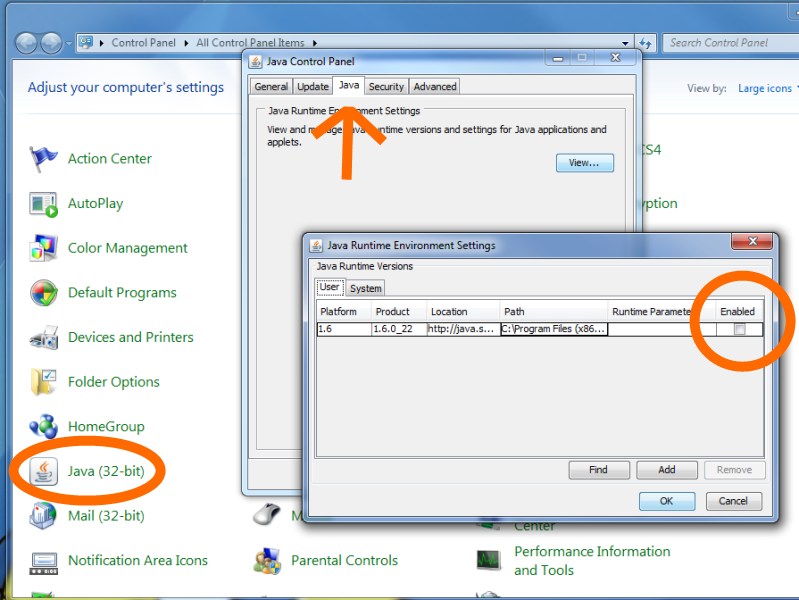
It’s straight forward to do. Just fire up Control Panel and select the Java (32-bit) selection, then pick the “Java” tab, click on “View” and deselect the “Enabled” checkbox and say OK. Screenshot below.

Screenshot for Disabling Java

If I run into a situation where I need Java, it’s simple enough to just re-Enable Java via the Control Panel.

The one question that pops into mind is whether Java is able to check for updates when this is disabled. If you know, please leave a comment as I’d like to know. Until I’m sure, I imagine I’ll be sure to go to the “Update” tab and click the “Update Now” button on Java before I’d re-Enable it.

I’m thinking this will protect me from the mean old Java bandits. If there’s a flaw in my logic, please be sure to let me know.

Posted in Computers and Internet | Leave a comment

ProRAID 4-Bay RAID Enclosure (now with USB 3.0 goodness!)

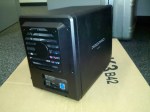
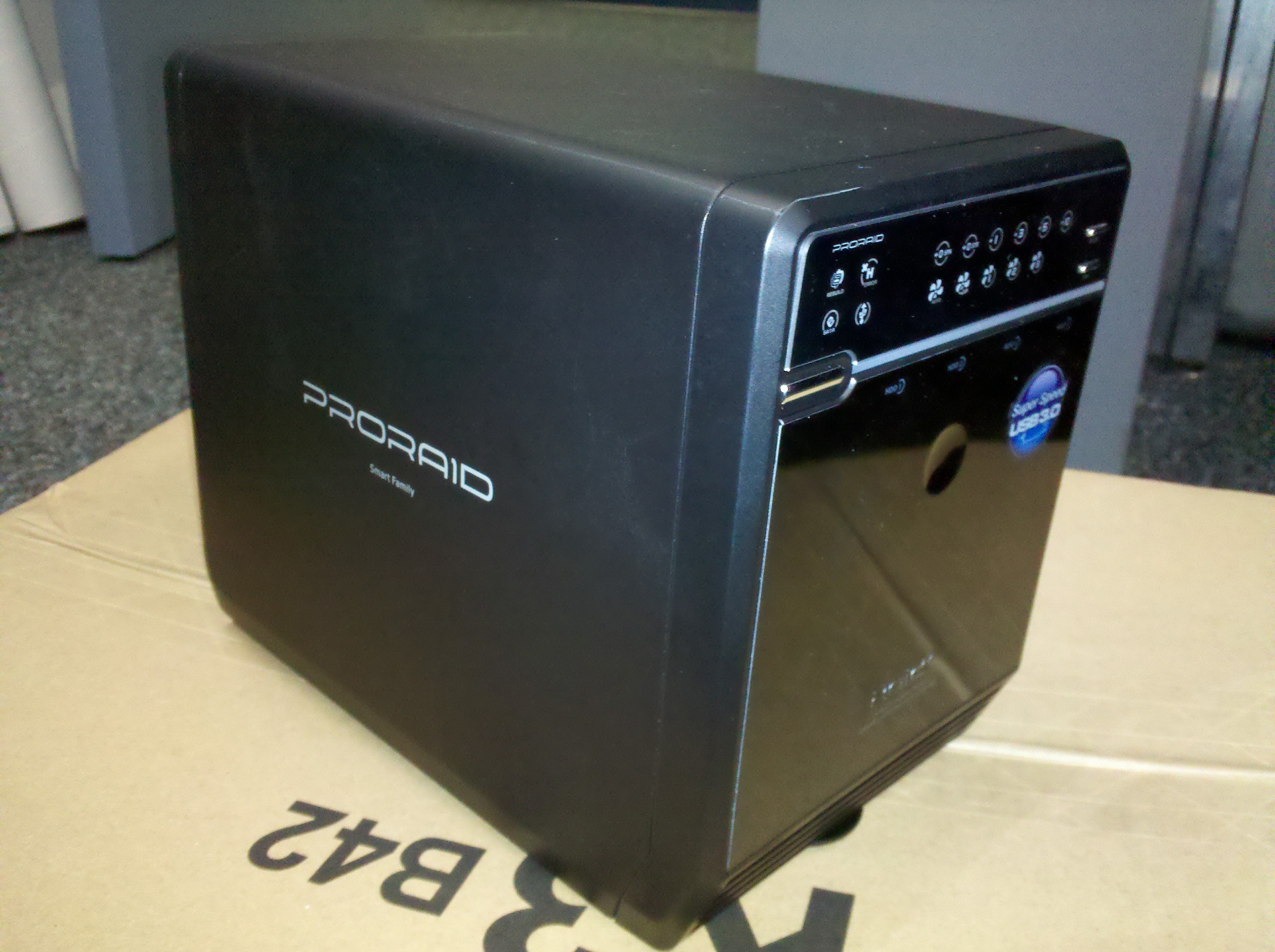
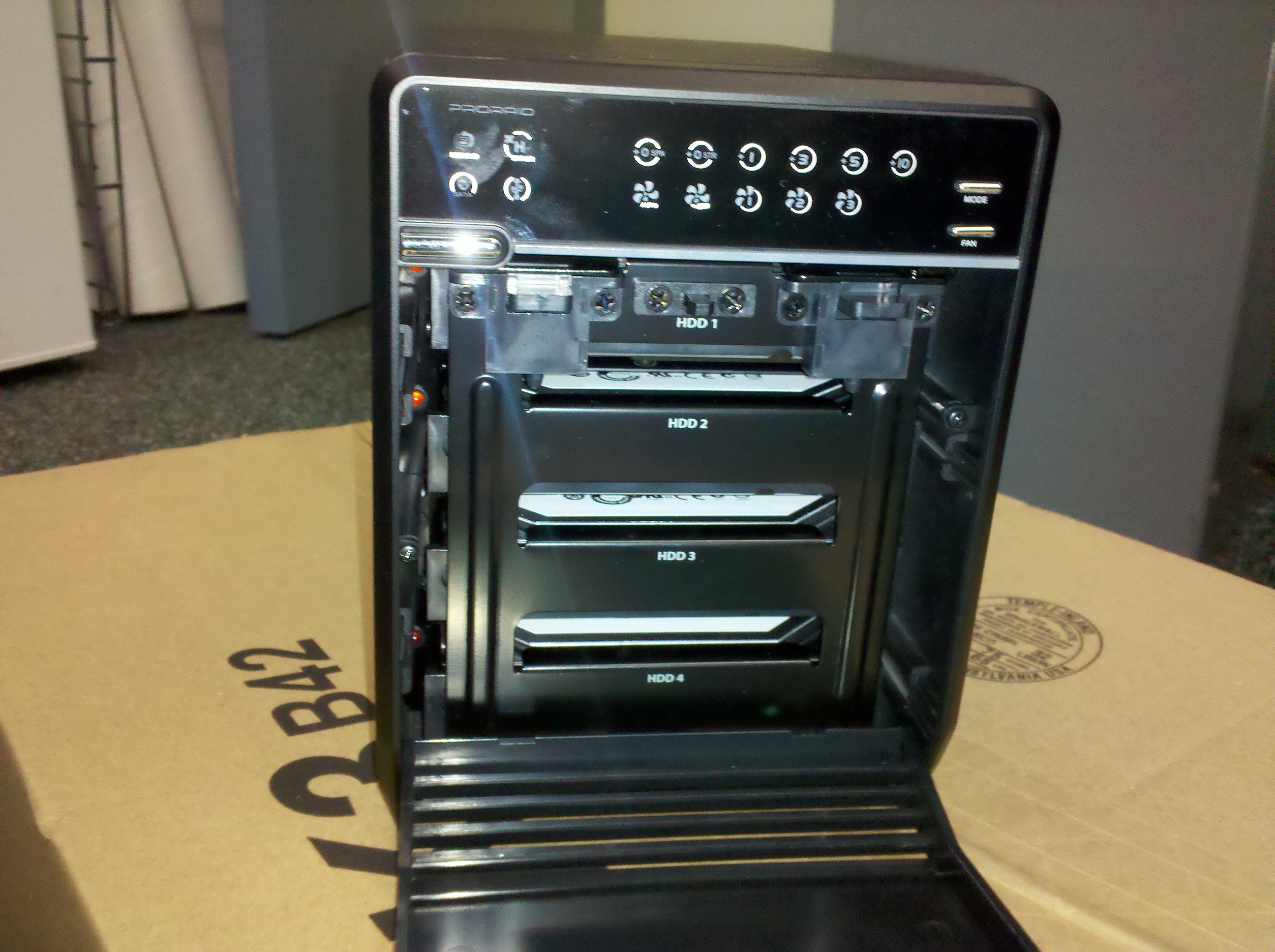
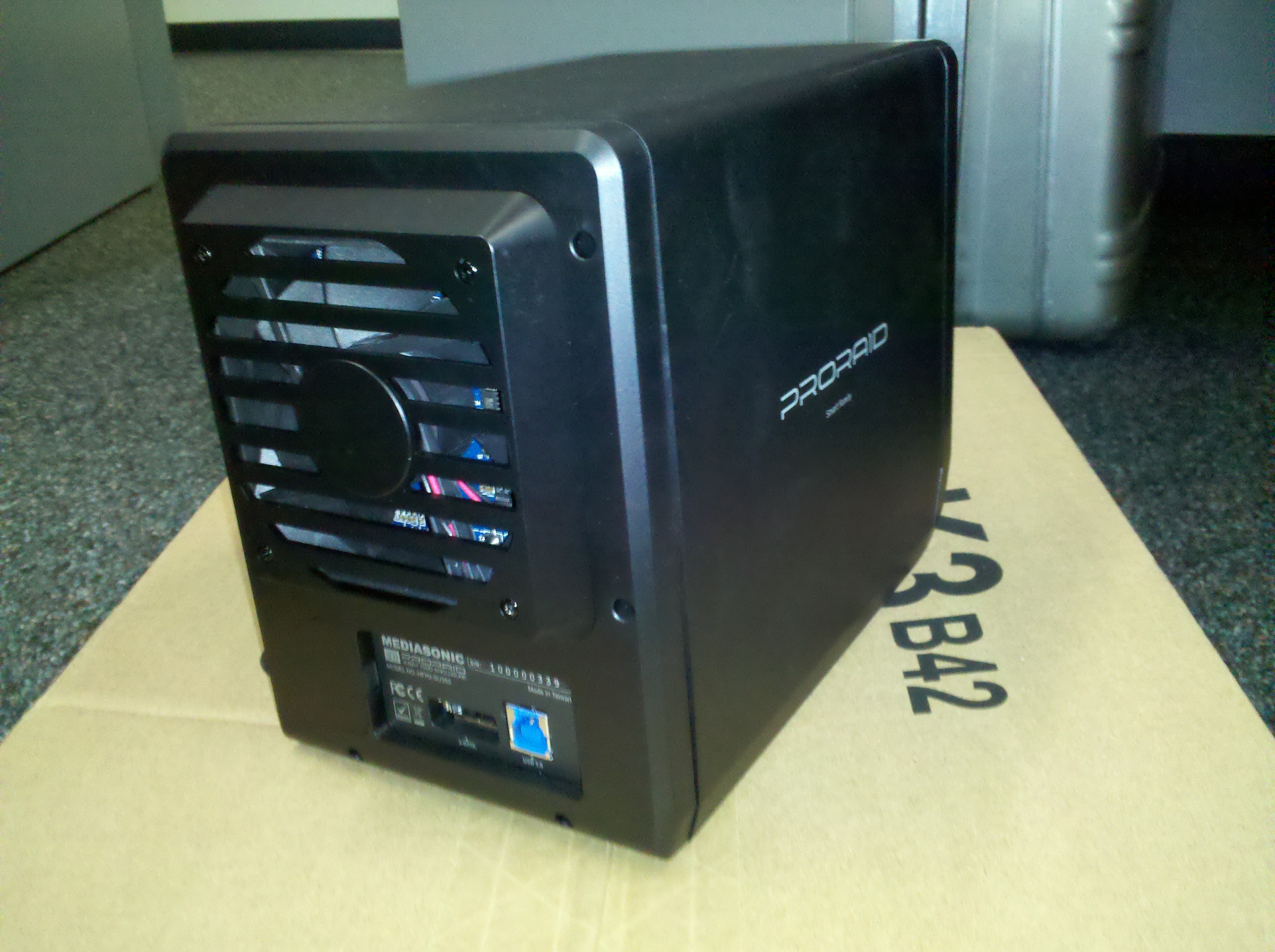
Behold the latest addition to my “how to schlep around tons of files” arsenal – the Mediasonic ProRAID 4-Bay RAID enclosure.
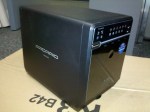
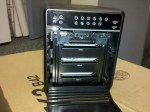
Mediasonic ProRAID 4-Bay RAID EnclosureMediasonic ProRAID 4-Bay RAID EnclosureMediasonic ProRAID 4-Bay RAID Enclosure Rear View

The problem I needed to solve was how do I back up and/or transport Terabytes worth of data? Once we start adding a couple of 1.5TB drives to a desktop or server, we’re pretty much locked into having to move these files from system to system using either a network connection or (goodness forbid) a USB 2.0 transfer cable or the like. Even at Gigabit network speeds, transferring a couple of Terabytes will take some substantial time. This particular enclosure, however, solves pretty much all of my problems.

Transfer Speed

This model of ProRAID enclosure supports both USB 3.0 (backwards compatible with USB 2.0) as well as eSATA. This means that I can copy TB worth of data in hours instead of days and that I have the flexibility to use USB 3.0 or eSATA add-on cards, both of which are relatively cheap (~$30 or so). If I’m in a pinch, it’s easy enough to drop back to USB 2.0 connectivity to the device, which pretty much everything supports these days. Modern motherboards are now coming out with USB 3.0 ports on them, so the investment should pay off going forward. Transfer speeds via eSATA can happen at up to 3Gbps and the USB 3.0 transfer speeds are billed as “up to 5.0Gbps”.

Storage Capacity

I use Hyper-V as a server virtualization solution, and on a monthly basis I will export each of my virtual machines and their virtual hard drives, 7-zip them up (encrypted of course) and store a copy both onsite and offsite. Even zipped, these files can consume anywhere from 5-30GB each. I am also a bit of a data pack rat, and I don’t like to delete datasets, source code, projects, etc until I absolutely have to. This means that my storage requirements are definitely not modest. Since the enclosure can accomodate up to four 2TB drives, it can theoretically handle up to 8TB of data. I say theoretically because unless you’re wanting to take a big risk with your data, you’ll want some form of redundancy across the disks (the “R” in RAID ;?) Since all of my servers employ RAID disks, they tend to hold more data than can be stored on any single hard drive – so this enclosure solves my drive capacity issue.

Data Redundancy

If you have only one drive, you’ve got all your eggs in one basket. If the drive fails, you run the risk of losing all the data that’s stored on it. Once you start adding multiple drives to the mix, you can start increasing your storage capacity, but you’ll also end up increasing your risk of data loss if a single drive fails UNLESS you employ the RAID functionality that’s built into an enclosure such as this. (Take note that this is the Mediasonic “RAID” 4-Bay enclosure and not just the Mediasonic 4-Bay enclosure – which sells for ~$100 less). I won’t go into the various forms of RAID – the Wikipedia RAID article does a good job of describing them all. I will list the ones that this enclosure supports, which are:

  • RAID 0 – Spanning
  • RAID 0 – Striping
  • RAID 1 – Mirroring
  • RAID 3 – Striped set with dedicated parity
  • RAID 5 – Striped set with distributed parity
  • RAID 10 – Mirroring + Striping

I tend to settle on RAID 5 as it has a comfortable mix of redundancy and I only end up losing the capacity of one of the drives – so in my current situation, four 1.5TB drives in a RAID 5 configuration leave me just over 4TB of usable storage. You can get up to 6TB or so by bumping up to four 2TB SATA drives.

Operating Systems Supported

One other requirement for maximum flexibility is to have a full spread of modern operating systems supported. This device is listed as being supported on Windows (XP, Vista, 7 and 2008 flavors) as well as Mac 10.x or later. Pretty much what I work with these days. Note: if you’re a Windows user, to achieve the full capacity of drives presented to the operating system that are over 2TB in size, you’ll probably have to set the drive to use GPT (GUID partition table) instead of MBR (Master Boot Record) when you configure it for its first use.

Cooling Fans

The one thing that bothers me about many of the other external enclosures is that they have no cooling fans on them. They list it as a “feature” that the enclosure has no fan and is therefore quiet. My experience has been that when I’m transferring files to an external drive (many times overnight since it can take that long or longer) – the drives get stinking hot. I mean so hot that you can’t even touch them, much less pick them up. As we all know, heat is not your friend when it comes to electronics, so the fact that this enclosure has a nice beefy fan is a definite plus. They list it as a “Smart Fan” as you can either manually control the speed (and thus the noise level) of the fan, or you can switch it over to smart-mode, wherein it adjusts the fan speed based on temperature sensors in the chasis. I like this flexibility as well.

Final thoughts

As you can tell, I think this RAID enclosure is the shizzle. It’s not much bigger than four hard drives stacked on top of one another – dimensions are 21.5cm (Depth) x 12.6cm (Width) x 16.6cm (height). It meets pretty much every one of my needs, is priced right (~$249) and was easy to configure the RAID by selecting the RAID level you want using the button on the front and accepting that RAID level by pushing an accept button in the back (covered to prevent accidental RAID level switchage and thus data loss).

I’ve only had it for a week, so your mileage may vary – don’t shoot the messenger and make sure you do your research before you spend your hard earned money on one of these. One thing that I didn’t mention in the redundancy side is that now instead of an individual drive failure being a weakness, the viability of the drive enclosure is that weakness. If the main board in this enclosure fries, I’m not quite sure how one would recover the data from the drives. Can you just plug the drives into another enclosure and have them automagically recognized? I’m not sure, so if you know, please add a comment to this post.


Posted in Computers and Internet, Science and Technology | Tagged , , | Leave a comment

MiFi for Personal Mobile WiFi

MiFi Picture

MiFi Picture

I went off-campus for a few days last week to another academic institution. One of the problems with going offsite is that I still have to keep in contact with the mothership via the internet. While it’s possible to navigate the red tape and try to secure internet access or to pay for hotel wifi and the like, it always ends up being a hassle. Not too long ago, I managed to get ahold of a Verizon MiFi 2200 device (pictured above) so that I could remain productive from afar.

The MiFi 2200 is basically a mini cell phone sans the phone functionality that serves as a portable wifi hotspot. The device can either be tethered to a laptop via a USB cable, or it can run stand-alone (no USB cable) and presents itself as a wifi hotspot that will allow up to 5 devices to connect to it via a WPA-2 encrypted session and access the internet. It has an internal battery and is supposed to function for up to 4 hours as a hotspot using it. As the picture above shows, it’s about the size of a credit card, and is about 1/4″ thick, which makes it easy to pack or carry about in your shirt pocket.

The beauty of the device is that rather than having to pay for a single-purpose USB modem that requires your computer to consume and/or serve up the internet, you get a multi-purpose device that can provide internet access for your laptop and up to 4 other devices simultaneously. This means you can share the internet connection with other wifi clients even when your laptop is off; such as an iPod Touch, iPad, laptops and even your wifi-enabled smart phone to keep the data costs down.

Verizon’s data plan has various tiers and costs, but they’re not the only players in town.  Sprint, AT&T and others also have similar devices. While it’s possible to provide a similar wifi hotspot functionality using certain smart phones (think Android phones running Froyo), the risk of killing my cell phone’s battery to provide the mobile wifi just doesn’t sit well with me. Another plus is that I like the flexibility to be able to still use my phone, but to position the MiFi in the best spot in the room to get a clear cell signal.

I’ve been running the MiFi for a couple of months and I have to give it a thumbs up for the flexibility and functionality that it provides. I’ve even heard of users using velcro to attach these to the back of their iPhones so that they can get reliable wifi ;?)  All-in-all, a worthy addition to my technology toolbox (backpack).

Posted in Computers and Internet | Leave a comment

Jaguar C-X75 Concept Car – So Shiny!!!!

I am in the market for an electric car. Well, actually, I’ve been in the market for a FLYING car my whole life but to date my hopes of ever having one are at an all time low. Magazines like Popular Mechanics have been promising that they’re just around the corner since the 1940’s but alas, no flying car sits in my driveway…sigh…

I fired up Twitter this morning and something shiny caught my eye from Engadget, the Jaguar C-X75 concept car that Jaguar is taunting us with to celebrate it’s 75th anniversary…squirrel

The car is gorgeous and awe inspiring and will never see the light of day (isn’t that the definition of a concept car?). Popular Science has a blurb about it as well, but they start comparing its specs against those of the Chevy Volt – like there’s some kind of correlation between this fantasy car and a real-life-shipping-today car like the Volt…weird analogy. I looked at the Jaguar site, but didn’t see any mentions of it, just their production cars. A little more digging, however, and I found much better specs on the C-X75 can be found on the TopSpeed site along with a nice photo gallery.

Like I said, I don’t expect this car to ever see production, but I do expect to see innovations like the independent micro-turbines for extending the range and power available to vehicles down the pike. For now, I’ll continue to dream about my next electric-powered vehicle and hope that eventually I’ll have one that flies ;?)

Posted in Science and Technology | Tagged | Leave a comment